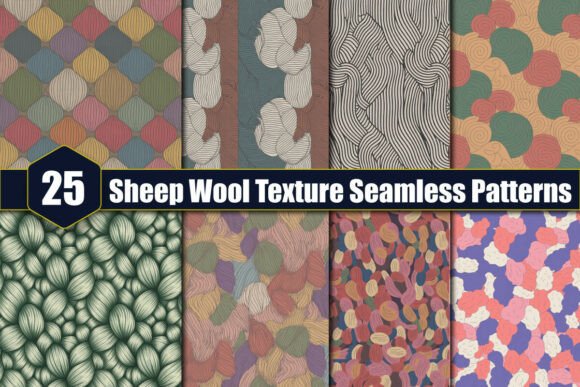
25 Sheep Wool Texture Seamless Patterns
When you are looking for high-quality digital assets to elevate your creative projects, finding textures that feel authentic yet versatile is crucial. The collection of 25 Sheep Wool Texture Seamless Patterns offers a compelling solution for designers, crafters, and content creators who need that tactile, organic feel without the hassle of physical photography or scanning. These patterns provide a seamless loop of wool-like imagery, allowing for infinite tiling across backgrounds, fabrics, or digital mockups. However, before you add this pack to your cart or start designing, it is important to understand exactly what you are getting, how to use it effectively, and where common pitfalls lie.
Understanding the Asset: What You Actually Receive
One of the first misunderstandings buyers have with digital texture packs is assuming they receive vector files or editable source documents. In this case, you will receive these designs in JPG format. This is a standard raster image format, which means the resolution is fixed. While JPGs are universally compatible and easy to work with in almost any software—from Adobe Photoshop to Canva—they do not scale infinitely without losing quality.
The specifications for this pack are quite robust for its format. Each pattern is provided at 300 dpi (dots per inch) with dimensions of 12″ x 12″ inches, which translates to 3600 x 3600 pixels. For most print-on-demand applications, web graphics, and standard scrapbooking layouts, this resolution is more than sufficient. It ensures crisp edges and clear detail when printed at standard sizes. However, if you plan to blow up one of these images to cover a billboard or a large outdoor banner, you may encounter pixelation because the file size is limited by the 3600-pixel width.
The AI-Generated Reality Check
A critical detail to note is that these designs are AI-generated. This does not mean the quality is poor; in fact, modern generative AI can produce highly sophisticated textures that mimic natural fibers with impressive accuracy. But it does require a shift in how you evaluate the asset. Unlike hand-drawn illustrations or photographed real wool, AI textures can sometimes contain subtle artifacts, such as unnatural repeating loops, slight blurring in high-contrast areas, or "dream-like" distortions upon close inspection.
Practical Advice: Always download the preview or a sample file before committing to a full project. Zoom in to 100% on your screen. Look for irregularities in the wool clumps. If you see strange merging of fibers or inconsistent lighting that doesn't make sense physically, you may want to adjust the opacity or blend mode in your design software to hide these minor imperfections. The prompt notes that the image quality is very good, which is generally true for general-use backgrounds, but professional print work often demands rigorous scrutiny.
Common Mistakes When Using Seamless Textures
Even with high-resolution files, users often make errors that compromise the final look of their projects. Here are a few frequent missteps to avoid when working with 25 Sheep Wool Texture Seamless Patterns.
- Ignoring Aspect Ratios: Because these are square 12x12 inch images, they tile perfectly in both directions. However, if you stretch them non-proportionally to fit a rectangular card or website header, the wool fibers will look squashed or elongated, breaking the illusion of realism. Always maintain the aspect ratio unless you specifically want a distorted, abstract effect.
- Overlooking Print Bleed: If you are using these patterns for wrapping paper, hang tags, or invitations, remember that printers usually require a bleed area (extra space around the edge that gets trimmed off). A 12x12 inch image might not give you enough room for a 4x6 inch card with a 0.125-inch bleed on all sides if you are cropping tightly. Plan your layout so that the seam of the seamless pattern falls away from the focal point of your design.
- Assuming Editability: Since these are flat JPGs, you cannot easily isolate individual strands of wool or change the color of the sheep without complex editing techniques like masking or content-aware fill. Do not expect to be able to pick out a single thread to fix a mistake. Work with layers and masks to integrate the texture into your design rather than trying to edit the texture itself.
Best Applications for This Digital Download
This pack is incredibly versatile, but some uses yield better results than others. Because the texture is warm, neutral, and organic, it pairs exceptionally well with rustic, bohemian, or minimalist aesthetics.
Crafting and Scrapbooking
For hobbyists, these patterns are ideal for digital scrapbooking pages or printable craft kits. You can print the 12x12 inch sheets directly onto cardstock for decoupage projects or use them as background layers in apps like Procreate or GoodNotes. The seamless nature allows you to create continuous backdrops for journaling cards.
Web Design and Blogging
Bloggers and marketers can use these textures as subtle background elements behind text boxes. The wool texture adds depth and warmth, making a website feel more inviting and less sterile than plain white or gray backgrounds. Ensure there is enough contrast between the text and the textured background to maintain readability.
Product Mockups and Packaging
Small business owners selling handmade goods can use these patterns for digital mockups of packaging. Imagine a soap brand using a sheep wool texture to convey natural ingredients. You can overlay product photos onto the texture to create realistic lifestyle shots without needing a physical studio setup.
Technical Considerations Before You Start
Before you begin your creative process, take a moment to prepare your workspace. Ensure your software supports high-DPI images if you are doing print work. Check your color profile; JPGs typically use sRGB, which is safe for web but may shift slightly when printed on CMYK printers. If color accuracy is critical for your brand, convert the image to CMYK in your design software before printing.
Also, consider how you will manage the files. With 25 different patterns, organization is key. Create folders labeled by tone (e.g., "Light Wool," "Dark Wool," "Cream") or by intended use. This saves time later when you are rushing to meet a deadline and need a specific vibe quickly.
Final Thoughts on Value and Usage Rights
This is a digital download only. There are no physical items shipped, and you cannot return the product once downloaded. This is standard for digital assets, but it underscores the importance of verifying the style and quality matches your needs before purchasing. The value lies in the convenience: you get 25 distinct, high-resolution textures that save you hours of searching for free stock photos that often come with restrictive licenses.
Whether you are creating wedding invitations, designing a cozy autumn-themed blog post, or making custom gift tags, these patterns offer a reliable, professional touch. By understanding the limitations of JPG formats and the nature of AI generation, you can leverage these assets to create beautiful, cohesive designs that stand out. Remember to check the seams, respect the resolution limits, and let the texture enhance—not overpower—your primary message.